Online Portfolio

Wednesday, 7 April 2010

The Weight Problem

Probably one of the most consistent comments from leads and animation directors during review is that a character 'needs a little more weight', and frustratingly it's not always easy or obvious how to rectify this. Sometimes it's down to posing and balance but often it's just that the character feels too light as they are moving around.


weight through posing by Wayne Gilbert

How to make things look heavy in animation is something that even experienced animators struggle with. I touched on this subject in my bouncing ball lecture but I think it would be good to go into more detail and really figure out how and why objects feel weighty or not when in movement. In the lecture I showed how to vary weight in the bouncing ball by altering the 'gap' - the distance between the last drawing of the ball falling and the 'squash' frame when it first impacts the ground.


These balls appear to have different weights; the one on the left feels like a ping pong ball, the one in the middle, a tennis ball, and the one on the right feels more like a bowling ball. Why does this work? All I have affectively done is slightly evened out the spacing of the heavy ball and lessen the distance the ball falls, which affectively makes the ball fall slower than the other balls. How does that make something feel heavier? Common sense would tell you that a heavier object would fall faster and accelerate more quickly, surely that is the way to make things look heavier? It seems counter-intuitive to have something you want to feel heavier, fall slower than something lighter.


But as Galileo Galilei famously proved gravity accelerates all objects at the same rate.* He demonstrated that if he dropped dropped a ten-pound weight and a one-pound weight off the Leaning Tower of Pisa they would hit the ground at the same time. Gravity acts on all objects equally despite their size and weight. This gives us quite a headache, is it therefore impossible to make a character seem heavier through gravity? If all objects fall at the same rate how can we make some feel heavier than others?

Maybe we're missing something, lets look at how gravity affects an object falling from different heights.

*Obviously there are other factors to consider the main one being air resistance if you had an object that was very light but had a large surface area, such as a feather then it will obviously fall much slower than a something of greater mass but with less surface area such as a cannon ball, but in a vacuum the ball and feather will fall at the same rate. In animation we are mostly dealing with characters - human or animal which are made of the same stuff - bone, muscle, fat, skin, and will therefore have about the same weight to surface area ratio. We can therefore take Galileo's law to be true - an elephant will fall as fast a mouse.

Ball Tests from Brendan Body on Vimeo.


Here I'm dropping a ball from 30cm*, 100cm, 200cm and 400cm and on the right of the screen I'm counting how many frames the ball falls for.

The results are as follows -

30cm = 6 frames
100cm = 11 frames
200cm = 16 frames
400cm = 23 frames

* not quite as accurate as I would like because I couldn't see what I was doing too clearly.


Here I have created a composite image of the tests, I've drawn a circle round the ball to help clarify their position. I've also adjusted the images so all the start and ground positions are at the same height on the screen.


If we simplify this further so we can just concentrate on the spacing, we can see the greater the height the ball falls, the more frames or longer it takes but interestingly the more even the spacing becomes.


In fact the spacing only appears very extreme at the start of the first test. Although this extreme spacing occurs at the start of the other drops, it is over such a short distance that it becomes hard to perceive that the ball is moving at all. Also look at how more even the spacing gets the further the ball falls, the spacing at the bottom of the last drop looks almost equidistant - the overall effect is that if the ball is falling from a great height it's motion is more even than if it's falling from a small height.

So we can deduce that the further an object or character falls, the longer this will take but also the more even the spacing will become.


Now, try and apply this information to an animation problem. Let's say we are given a scene to animate were a tyrannosaurus walks across frame.

We want this creature to appear realistic and obviously big and heavy, but we are unable to simply copy it from nature, there is no bipedal creature alive today that is as big as the Tyrannosaurus and therefore nothing we can use as reference.
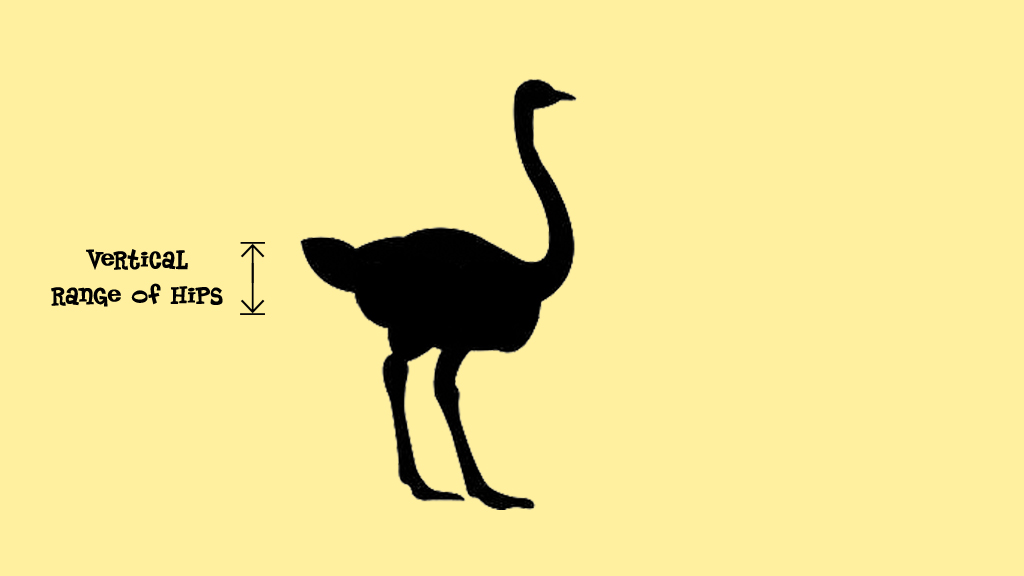


However, we might look to a large bird from today like this ostrich, and try and scale up it's walk. Let's say we find a piece of reference where an ostrich walks through frame like above. You'll notice that like the ball images, the two creatures appear the same size in their respective shots. Although we know this to be false, it's easy to get sidetracked by the size of something in screen (or 'screen space'). In our computer scenes and on our pieces of paper there is often very little to help us get a good idea about how big something is or how far it's moving. Even though the ostrich and the Tyrannosaurus appear the same size in the two images, we know that the ostrich is 2 meters (6½ ft) tall were as the Tyrannosaurus is double the size at 4 meters (13ft). There is also a huge difference in weight between the two, the ostrich weighs just 45 kg (100lb) were the Tyrannosaurus is around 6.8 metric tons in weight.

To apply our ball information, let's look to the part of the body that falls during the walk cycle - the hips. We could take the range of movement in the ostrich and apply it to our Tyrannosaurus.


Let's say upon studying the ostrich we found that it's vertical hip range was 30cm*, we could then determine the tyrannosaurus' range. But how would we show this extra distance in movement? Well, we can use what we've just learned from the ball, for an object to fall 30cm will take around 6 frames. We know the Tyrannosaurus is double the height of the ostrich and therefore it's vertical hip range would be 60 cm. We know that it would be impossible for the Tyrannosaurus' hips under gravity alone to fall this distance in the same time, and we could probably make quite an accurate guess as to how long it would take to fall this far (8-9 frames) we also know that since the hips are falling further the spacing will appear more even, again we could use our ball images above to apply quite an accurate result.

*I've exaggerated the range in this example for clarity, in reality an ostrich's hip would on raise and fall around 2 inches (5cm).


But why stop here? We could take this further, we could exaggerate these values for the Tyrannosaurus and imply that he's even bigger than he is. If we use a few more frames and make the spacing slightly more even, we will give the effect that the Tyrannosaurs is actually even bigger and HEAVIER than it might actually have been.

And this is really the point I'm trying to make, the animator actually has a great deal of power over the physical world of their character. They can create a false gravity to imply the size - although the audience gets the impression that gravity has stayed the same and the object has got bigger.

We cannot use gravity to make an object seem heavier, instead we must create our own gravity to imply things are bigger and therefore heavier.


If we go back to our bouncing balls again we can see that what we've actually done. By reducing the final gap before the squash, this implies that the ball is bigger. So, by reducing the amount it's falling, we are effectively making it fall slower and by lessening the 'gap' we've evened out the spacing. All these things imply that the ball is bigger (as well as heavier) but further away.


For more confirmation of this theory let's look at something truly massive falling from a great distance - a huge piece of ice falling from the end of a glacier.


The ice in this video is traveling around the same distance in frame as our ball tests, but look how long it takes to fall this far. It looks almost as though it's in slow motion, when in fact, the ice is falling at around the same rate as our ball. As we are further away it seems much slower, and look at the spacing, it's even more even, the ice looks like it's falling at a constant speed, only very slightly accelerating.

But weight is not only a gravitational, vertical issue. As things move horizontally or in any direction around the screen, they can feel light. Often it's our inability to determine actual distance in our shot or 'screen space' that is conspiring to confuse us once again.


Let's look at two animals we might animate. The fastest land animal in the world, the cheetah can run at 60 mph, however the cheetah is still a big animal so we also need to show it's weight.


Let's compare it to a small animal, like the squirrel, which can run only at 20 mph. However, the squirrel is much lighter and if we compare speed for their size - by seeing how long it takes each creature to run it's own body length.


We find that the squirrel for it's size is actually quicker than a cheetah.


Weight is a fine balancing act. Often we want big, heavy things to move fast but we always have to keep in mind that they are big and to show that size (and weight) they have to move slower through shot comparatively than something that we want to appear light.


Also, as we found in our ball test, our acceleration or spacing on a small creature like our squirrel, can be more extreme. Because of it's tiny weight, a squirrel can accelerate to it's top speed very quickly (over just a few frames) which means more exaggerated spacing. Where as a big animal like the cheetah takes longer to reach it's top speed and therefore has more even spacing.


But keep in mind animation is not about recreating reality. We can also play with weight, making some characters feel heavier which can give them a greater presence in a shot and therefore a greater sense of importance.

Yoda is a small yet powerful character. His movement is usually slow and considered which subconsciously tricks the audience into thinking that he's larger and therefore more important. When Yoda jumped around during his light sabre duel in Star Wars : Attack of the Clones his character was made to look light, this destroyed the illusion for many, he suddenly felt weaker and less important at precisely the moment he needed to look strong.

This weight theory is not just about making big characters seem big, it can also be used to give weight and gravitas to small light characters when they need it.

Thursday, 4 March 2010

Legend of the Guardians Trailer


Yay! I finally get to show something from the film I'm currently working on - The Legend of the Guardians, directed by Zack Snyder of Watchmen and 300 fame. It's based on the book series The Guardians Of Ga'Hoole by Kathryn Lasky.


I was fortunate enough to animate two shots for the trailer, one where an ominous group of owls adopt an attacking formation.


And the shot at the end were a heroic owl rises, carrying a burning lantern. I've been animating a lot of shots in slow motion on this film, something I've never done before. It poses quite an interesting challenge, I'll have to write a post about it soon.

There's a lengthy article about the film here for anyone who wishes to find out more.

Enjoy.

Friday, 19 February 2010

Broken Computer


Apologies about the lack of posts recently. Unfortunately my home computer is currently not working and it'll be at least a week or two until it's fixed, but I should have something really good to post very soon ...

Wednesday, 23 December 2009

Happy Holidays Everyone!

Well it's Christmas here in Sydney which is a little odd to someone from Scotland, where the temperature's only a couple of degrees at this time of year, but I'm enjoying it all the same.


Sorry my posting has slowed down recently. Unfortunately I've been rather busy over the festive period with one thing and another but I should have some exciting things to share with you in the new year. A big thanks for all the support everyone has shown me for this blog, it's very much appreciated.

The above picture of me was taken by local Sydney photographer Eugene "Uge" Tan. Check out the amazing water photography at his website aquabumps.com.

All the best,

Brendan

Thursday, 19 November 2009

Squished Tooth Fairies

I found another playblast of a Hellboy 2 shot I worked on so thought it would be fun to show it here and also explain how it was done.

Playblast of the Hellboy Rolling Statue from Brendan Body on Vimeo.


It's from the film's 'Tooth fairy' sequence. The first half of the movie is the playblast, the second half is an early comp with basic textures and lighting, a first pass at the background 'swarm' fairies and a few of the other effects.

There were several narrative points that had to be addressed in this shot. In the first part the director Guillermo del Toro wanted the rolling statue covered in squashed Tooth Fairies, this had to then reveal a mass of dead and dying Tooth Fairies, twitching and writhing around.


I approached this by first creating a library of cycles that I could reuse quickly and easily to create a moving carpet of the creatures.


Above I've named the cycles and shown how they were applied ... as best as I can remember.

Face Up 1, Face Up 2 and Face Down are cycles I kept predominantly still but with some random spasms and twitches.
Twitcher - Flails around, letting out an agonising scream then finally relaxes and coils into his death pose.
Kicker - is based on an insect video I found on youtube. The idea is that the dead insect's nerves keep his legs kicking, this drives his body round in a circle.
Crawler - with his legs and one arm badly injured, this fairy pulls himself along by his one good arm.

The rigs also had a clever function - a series of blendshapes that could be dialled in to give the effect that a leg or arm was missing. There were also shapes that got rid of everything but the chest, head, or hips and legs. This meant I could quickly and easily make the cycle look very different by removing half the fairy, or could superficially make a cycle look distinct just by removing a few legs or an arm.

I populated this section of the shot with these characters, then tried to create 'hero' tooth fairies to give the viewer interesting things for their eye to settle on ... and also to amuse myself. There was a platform in the top left of frame so I placed a hero 'kicker' on there - he drops off the statue then feebly kicks himself in a circle. In the centre of the picture, '2' drops off the statue into frame to draw your eye into the picture. '3' - a badly injured 'crawler' drags his torso forward leaving the rest of his body behind.


The next level of Fairies had to interact with the characters, these were some of the most fun to do. They are lead by the actions of the actors who are miming being attacked by the creatures. It was then my job to find a series of movements that would fit the actions performed. For this to work convincingly, the characters movements have to be rotoscoped onto CG doubles. My memory's a bit hazy here but I think I did both Hellboy and Abe in this shot, (apologies if it was someone else). Double Negative had a neat little tool that made it easy to constrain the Tooth Fairies to the geometry of the CG doubles and it could be easily animated on and off as they landed and then took off or got hit.

There are four of these 'attacking' Tooth Fairies in the shot, two on Abe when we first see him, one who lands on Hellboy, and one much later, and you'll have to look very closely for this, on Abe's leg when he is on the stairs - Abe sweeps him off, he hits the banister and bounces back onto the stairs and is then stood on.

I'm always impressed by actors who can convincingly mime such actions with nothing to guide them, it also makes the animator's job a lot easier. The actor who plays Abe, Doug Jones, is awesome at this, I hope to write a post on just this soon.


The next level of Tooth Fairies are the ones that are to be shot by the various characters, you'll notice in the playblast in the top video that the gun blasts are absent. It was up to me to work out when the best and most appropriate time for the gun to go off. Again much of this is driven by the performance of the actors.

To create exploding fairies I was able to use the limb removing blendshapes I mentioned before. When a fairy is shot his visibility is switched off, at the same time several other fairies appear with their various parts hidden, they are then scattered to create the impression that the fairy has exploded. The effects department then added in some liquidy gloop to give the fairies a nice splat too.


I also used this technique for the fairy that Hellboy swipes, I thought that since Hellboy is supposed to be incredibly strong it would be good to have this one disintegrate with the impact.

Each rig in the scene slowed it down so I tried to be as efficient as possible with my Tooth Fairies, you'll notice many of the attacking, or being shot in the background swoop past camera to get extra value out of them.


Amusingly, in the first playblast a member of the on set crew also makes an appearance, he was painted out in in final plate.

Hellboy Rolling Statue Sequence from Brendan Body on Vimeo.


Here is the finished shot. As you can see many extra effects have been added - the swarm stuff is awesome as is the fire and tooth fairy blood and goo, on the ground around the dead fairies.

Wednesday, 11 November 2009

The Animator's Buffet


Animal Logic colleague and friend David Williams, has a great blog called The Animator's Buffet, David has an immense knowledge of animation history and has dug up some fascinating and varied examples to show, as well as including his insightful observations about them.

Check it out.

Also, I've recently added a 'Followers' gadget to the sidebar of this blog. If you find my online ramblings interesting you can now click "follow" there to be notified when I've posted something new. Many thanks to those who already have.

Saturday, 7 November 2009

Acting, Breathing and Al Pacino

Breathing is not something we are often conscious of, therefore animating a character breathing during dialogue is easily overlooked. Spending the time studying and adding this to your shot can really create a great sense of believability to your work. In fact, as we'll discover, breathing is something that can be used to drive a performance.

We first should take some time to understand how breathing works and what controls it.


Breathing, as I'm sure you're aware, is the expanding and shrinking of the lungs. This is primarily driven by the diaphragm which contracts, moving down and pulling air into your lungs, then during the exhale the diaphragm relaxes, moving up and expelling the air from our lungs. However, this is not the only force acting on the lungs. There are muscles around the ribs which contract, expanding the rib cage by swinging the ribs up, then on the exhale they expand and the ribs swing down causing the rib cage to get smaller.


I've used a 3d animation package to create a graph which represents how lung volume changes during a typical breath taken when at rest. The air fills quickly at first then slows as it reaches the apex, on the exhale, the air leaves the lungs quickly at first then slows as the lung volume reaches it's lowest point.


However when we speak, our breathing pattern is very different. The air is inhaled as before but is then compressed, the muscles around the ribs and the diaphragm working against each other to condense the air in our lungs to create a positive pressure there. The air is then steadily released as the the dialogue is spoken, then after the line of dialogue is finished, the diaphragm is relaxed. This causes the last of the air to empty quickly from the lungs, then we start to breathe in and the process can begin again.


Of course this is not a one way process, dialogue also affects the lung volume - if the dialogue has a particularly loud accent in it, that will affect the lung volume by creating a sudden drop. I've represented this above in my lung volume graph by showing a drop in the curve. As well as loud accents, often 'w' sounds use greater amounts of air and will also cause the above to happen.

Now we have looked at this in abstract, let's look at an example. I've selected a clip of Al Pacino from the start of the teaser trailer for Ocean's 13. Al Pacino's breathing is often quite apparent in his performances. I suspect this is because he was originally a stage actor and has learned how to use and exaggerate his breathing to help to project his voice. But in this case, I believe he's using it primarily to drive tension into his voice.

Ocean's 13 teaser trailer can be found here

transcript -
"I know people, highly invested in my survival and they are people who really know how to hurt in ways you can't even imagine."

First, let's talk about the performance in general. Al Pacino's character Willy Banks, is a powerful and ruthless casino owner and he has just learned of Danny Ocean's plans to disrupt his business. In this shot, he warns him that there would be violent consequences if Ocean carries out these plans.


"You're joking?"

Al's character is incensed at the idea that anyone would set out to damage his business, although the conversation is conducted in public, he doesn't want to draw attention to himself. He's also very clever and doesn't want to reveal that he is affected by this. Al Pacino's performance is very restrained, but it's charged with an intensity which leaves us in no doubt that he is deeply enraged. He keeps his face predominately impartial, at only one point does he let the anger he's feeling creep briefly onto his face - just before he says "really know how to hurt". This is known as a 'microexpression', to do this voluntarily, really shows Al Pacino's acting genius, they naturally occur when someone is trying to conceal or repress an emotion. This one flashes across his face, it is literally only there for one frame, hard to spot when the clip is played at full speed but we read it subconsciously.


Microexpression - incandescent rage

There is a wonderfully subtle texture as well as a change in tempo and tone through the piece. During the first line "I know people" his body is ever so slightly loose and there is a hint of a smile that says "you're joking, aren't you?". Then, as he says "highly invested in my survival...", his body tenses, the speed of his delivery increases and we get that glimpse of anger he's feeling, then at "you can't even imagine" his eyes widen and his speech slows down again to intimidate his opponent by suggesting that he could do something crazy.


"I could do something crazy"

Al Pacino's phonemes, like his performance, have been kept small but he's using his breathing to generate as much tension in his voice as possible as well as project what would otherwise be just a whisper. He's forcing as much air as he can through the narrow exit of his voice box. If you watch his throat you can see it tense as he speaks, then relax as he releases the pressure to breathe in.

Analysis of Al Pacino's Breathing from Brendan Body on Vimeo.


Here I've animated a representation of his lung volume on the right hand side of the screen. If you would like to step though this video and/or view it at larger size I have placed a quicktime version here

What's interesting is how almost all his movement is initiated or affected by his breathing. You can see his body tensing as he compresses the air before each line of dialogue, then you see his body relax slightly as he inhales. This causes his body to rock backwards a couple of times during this scene. There is only one small body and head movement during "even" that appears to be separate from his breathing.


Here is the animation curve of the bar in the movie above. We can see how the breathing pattern we cited above appears throughout the performance, note the way it varies too. We can also see how the rhythm of his breathing echos the intensity in the performance - at the start during "I know people" his breath is slower, drawing out the exhale in his 'almost laugh', but as his delivery gets more vehement during "highly invested in my survival ... who really know how to hurt" his breathing gets faster, shorter and we find small half-breaths. Then during that intimidating last line, we can see how he slows down again.

So, how can we use this? Well, if you were trying to create a subtle performance and wanted to keep the character still, but not so much that the character 'dies', and obviously we don't want the character just floating around randomly, we could base the character's movements around the breathing and can be sure it will work and add to the performance. Also, if you wanted to create an intensity in your performance you could exaggerate the breathing and seek to show the the tension in the body as the character compresses and holds the air in their lungs as they speak.

Thanks to James Cunliffe who helped me put this post together.